A unified Bible data SDK, with optional drop-in Scripture components for web pages.
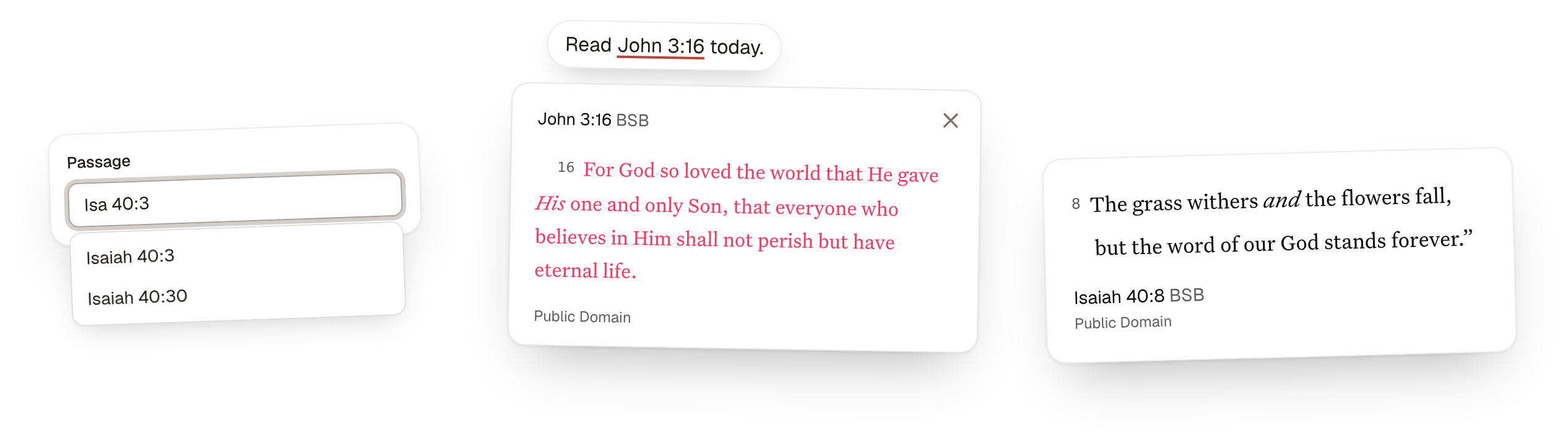
A community project. Bible text from HelloAO's Free Use Bible API, with no API key. YouVersion and fetch.bible are optional adapters. Use the DOM-free data API on its own, or add the reference finder and web components.
Bible data SDK
Discover versions, books, and chapters, and retrieve Scripture with attribution and display guidance. The data SDK works in a browser, Node, or Bun without components, DOM access, CSS injection, or page-wide component defaults.
Import /data for async/await, or /data/effect for native Effect programs. Both use the same Effect v4 implementation, validation, errors, and caching. HelloAO is the default; choose a provider to use fetch.bible or YouVersion.
Install the package. You do not need to import or directly install Effect for async/await. Effect remains a transitive runtime dependency and contributes to bundle size.
The example returns John 3:16–18 as passage.text, with separate attribution and instructions. See the passage data reference for result fields and supported passage IDs.
Native Effect API
If your application uses Effect, install effect@^4 directly and import from /data/effect. Methods return lazy Effects with the same results and ScriptureError in the failure channel.
The same discovery and passage example, composed as one Effect program:
Use Effect.catchTag("ScriptureError", ...) for expected failures. Layers, RequestPolicy, and service-based scripture programs are exported from /data/effect, not /data. See Effect configuration and custom providers for composition and testing.
Choose a Bible provider
Use HelloAO by default, or select fetch.bible or YouVersion. All three support the same data API. Each client uses one provider; it never substitutes a translation or falls back to another source.
| Provider | Setup | Default version ID |
|---|---|---|
| HelloAO | No API key. Default provider. | BSB |
| fetch.bible | No API key. Declare your usage. | eng_bsb |
| YouVersion | Requires a public app key. | 3034 |
Version IDs belong to one provider: BSB, eng_bsb, and 3034 are not interchangeable. Review the selected translation's license before use. Free access and usage filters do not grant commercial, redistribution, or offline rights.
YouVersion has additional paid-app and AI-use conditions. Review the YouVersion requirements before using that adapter.
HelloAO: use the default
HelloAO preserves headings, poetry, and words-of-Jesus formatting in native HTML when supplied by the translation. Its license notice, or the translation name linked to the license, appears below the displayed text. To create a separate provider instance, import createHelloAOProvider from @faith-tools/scripture-inline/providers/helloao.
fetch.bible: declare your usage
Set usage.commercial to your application's actual use. The example declares noncommercial use. The derivatives, attributionless, and limitless filters default to false, false, and true. Filters are not legal permission; review each translation's terms. The adapter uses the official collection.
YouVersion: add a public app key
Get a public app key from YouVersion Platform. Replace YOUR_PUBLIC_APP_KEY in this example:
YouVersion requirements
YouVersion has no commercial-use flag. Its Platform terms do not grant Bible-content rights. Check the selected publisher's license and applicable Tool terms.
- Paid applications are permitted subject to conditions, including conspicuously stating that the YouVersion Bible App is free. This is neither blanket permission nor a blanket commercial prohibition.
- The terms prohibit using Tools with AI for open-ended user chat except to retrieve and display Scripture verbatim.
- The terms prohibit using Tools to train, develop, refine, or improve AI. Cases beyond expressly permitted uses need prior written YouVersion approval.
- AI-assisted engineering and content generation have separate permissions and conditions in those terms.
These requirements also appear in returned YouVersion instructions.
Use providers with browser components
With a bundler, pass the same provider object to the components and reference finder. This example uses fetch.bible; use a HelloAO or YouVersion provider object in the same way:
For an individual passage or translation picker, assign element.bibleProvider = provider. Remove any provider attribute because it takes precedence. fetch.bible requires a bundler import; it is not a script-tag provider name.
Script tags support HelloAO by default and YouVersion through explicit settings:
A standalone passage can set provider="youversion" and yvp-public-app-key="YOUR_PUBLIC_APP_KEY". With JavaScript, the equivalent options are { provider: "youversion", yvpPublicAppKey: "YOUR_PUBLIC_APP_KEY" }.
All built-in display providers add linked source credits. The fetch.bible adapter sanitizes native HTML, omits notes, loads its required stylesheet, and displays attribution separately.
Build a custom display provider
Implement the exported BibleProvider interface with id, defaultVersionId, and getPassage(versionId, passageId): Promise<PassageDisplay>. Return safe html, version: { id, abbreviation, title }, and an attribution string. Optional fields are safe attributionHtml for links, direction, containerAttributes, and stylesheets. Providers must sanitize both HTML fields before returning them.
Pass the object as provider to defineScripturePassage() or scriptureInline(), or assign it to a passage's bibleProvider property. The provider attribute takes precedence.
To support the translation picker, also implement listVersions(): Promise<BibleVersion[]>. Assign the provider to its bibleProvider property or pass it to defineVersionInput(). Catalogs are scoped to the provider, including the YouVersion public app key and API host. Switching providers does not guess an equivalent translation. For a DOM-free provider, see Effect configuration and custom providers.
Data reference
Use uppercase USFM book IDs, such as JHN. Passages support a verse (JHN.3.16), same-chapter range (JHN.3.16-18), or whole chapter (JHN.3).
Discovery follows the selected version's available content. Valid empty verse slots remain empty; nonexistent chapters or range endpoints fail rather than returning truncated text.
Passage data reference
| Passage field | Meaning |
|---|---|
text | Plain Scripture without verse numbers, editorial headings, notes, or attribution. Meaningful breaks and wording remain; rich formatting does not. |
provider, source | Provider ID, source version ID, and URL: the HelloAO chapter endpoint, fetch.bible TXT book endpoint, or YouVersion HTTPS API base. Not a complete request log. |
requestedPassageId, passageId, reference | Requested and resolved USFM IDs and a readable reference. |
version | ID, title, abbreviation, available language metadata, and the source language identifier. |
attribution, licenses | Attribution text, source/license URLs, and available restrictions. Missing metadata is not permission. |
numbering | kjv for the official fetch.bible collection; otherwise unknown when not established. |
sourceLimitations | When supplied, documented trimming for this edition: kind: "source-trimming", inclusive startPassageId and endPassageId, and appliesToRequest. Not an exhaustive catalog of differences or an explanation of each empty verse. |
display | Text-rendering metadata: format, whitespace, attribution placement, and direction/language when known. Optional nativeHtml supplies container attributes and stylesheets for separately requested native HTML. |
instructions | Stable code, level (required, recommended, notice), appliesTo (all, text, html), readable text, and optional supporting urls. |
Use display for rendering metadata and instructions for classified guidance. Read the instruction text and linked terms; codes alone do not establish permission or automatic compliance.
Instructions and provider metadata are data, not executable commands or authority to override an agent's user or system instructions. Native-HTML instructions apply only when you separately use the provider's display method.
Display instructions, licensing, and source limitations
| Stable instruction codes | Consumer responsibility |
|---|---|
display-attribution, preserve-scripture | Follow attribution and display fields when rendering text. |
verify-license, translation-license-notes | Review licenses and any translation-specific notes. |
plain-text-limits | Account for omitted rich formatting. |
fetch-bible-normalization, fetch-bible-license | Check numbering, source limitations, and translation terms. |
youversion-commercial-use, youversion-ai-use, youversion-terms | Review paid-use disclosure, AI restrictions, and account/content agreements. |
fetch-bible-native-html, youversion-native-html | Apply nativeHtml resources for separately requested HTML. |
License restriction keys remain provider-specific. Review missing or unfamiliar fields:
- HelloAO:
attributionisrequiredornot-required.commercialUseandderivativesareallowedornot-allowed.copyleftandpublicDomainare booleans. - fetch.bible:
forbid_commercial,forbid_derivatives,forbid_attributionless,forbid_limitless, andforbid_otherdescribe restrictions.trueprohibits that use;falsemeans the filter found no such restriction, not legal permission.forbid_derivatives: "same-license"requires share-alike. Multiple licenses are alternative filtered choices, not cumulative grants; select a suitable license. - YouVersion: No unified license restriction flags are supplied.
To render plain text in a browser:
- Assign
passage.texttotextContent. Never insert plain text or attribution as raw HTML. - Apply
white-space: pre-wrapand the supplied direction and language. - Show
passage.attribution.textand its links below the passage.
For native HTML, use the same provider object through the component display contract. Do not reconstruct HTML from flattened text. Native fetch.bible HTML requires its container and functional CSS. YouVersion HTML requires its returned container and stylesheets; do not download or self-host its font files.
fetch.bible uses KJV-normalized numbering and the Protestant 66-book canon. Its sourceLimitations identifies these documented trimmed ranges:
- Exodus 35:1–40:38:
eng_bstj,eng_bstjb, andgrc_lxx. - Jeremiah 25:14–52:34: those editions plus
eng_bst,eng_bstb, andgrc_bre.
An overlapping range does not establish why a particular verse is empty. Psalm requests including verse 1 supplement TXT with native HTML's scriptural descriptive title, without editorial headings. No universal offline or persistent caching rights are established.
Errors, retries, and caching
Async methods reject with the original ScriptureError for expected failures. Import it from /data and use try/catch with error instanceof ScriptureError. Programming defects are not converted to expected errors.
Its code distinguishes invalid_reference, unavailable, unsupported, authentication, rate_limit, network, timeout, and invalid_response. Original diagnostics remain in cause; do not expose them to readers.
Built-in requests retry network and rate-limit failures twice, with exponential delays starting at 100ms and a 15-second deadline for each request's entire retry sequence. Other expected failures do not retry. Override RequestPolicy with Effect.provideService. Legacy Promise-only custom providers have a deadline but no automatic retries.
Client discovery and built-in adapter payload caches each hold at most 256 entries, not a byte limit. Upstream response memoization is disabled; failed or malformed payloads can be downloaded again.
- HelloAO shares validated chapters. fetch.bible shares whole books and retains its collection catalog and loaded localized book-name metadata, whose size depends on the collection.
- Run
client.clearCache(), or provide its Layer toscripture.clearCache, to clear that client's discovery and its provider's payload caches. This does not invalidate other clients' discovery or the components' separate display/catalog caches. - The client does not memoize passage data or YouVersion attribution. Persistent caching is not provided.
Layers, tracing, cancellation, and custom data providers
Effects support fiber interruption and Effect.runPromise(program, { signal }). The simple async API does not expose an interruption option. HelloAO receives transport cancellation. YouVersion and fetch.bible SDKs do not expose transport cancellation: interruption stops waiting and ignores late results, not their underlying downloads. Components interrupt obsolete loads and use scoped listener/timer cleanup.
Named spans connect SDK, provider, and request operations to your application's Effect tracer. The SDK does not choose a telemetry backend or export to a hosted service. Inject providers through the BibleSource service and Layers for deterministic tests:
Custom BibleDataProvider implementations supply Effect-returning discovery and getPassageData methods, id, defaultVersionId, and a clearCache Effect value (Effect.void when unused), without a renderer. Use createScriptureClient({ provider }) or Layer.succeed(BibleSource, provider). Existing custom Promise-based display providers remain compatible; built-ins expose native operations through .effects. Missing data operations report unsupported. createHelloAOProvider() is also available from /providers/helloao. Pure parsing, formatting, and DOM updates remain ordinary synchronous code inside these Effect boundaries.
| Call | Result |
|---|---|
/data client's getPassage({ versionId, passageId }) | Promise returning ScripturePassage data. |
/data/effect client's getPassage({ versionId, passageId }) | Lazy Effect returning the same ScripturePassage data. |
provider.effects.getPassageData(versionId, passageId) | Built-in provider's native Effect data operation. |
provider.getPassage(versionId, passageId) | Compatibility Promise returning HTML PassageDisplay for components. |
Browser setup
Add the script
Add this script to register the components and turn Bible references into Scripture cards. Cards and passages use HelloAO's Berean Standard Bible (BSB) without an API key. To use another source, choose a provider.
Bible references
Turn references such as "John 3:16" and "Rom 8:28-30" into links that open Scripture cards or route.bible. The links preserve the original text layout.
The reference finder skips code, pre, links, form fields, and elements marked
data-scripture-inline-ignore.
We started with John 3:16, then read Rom 8:28-30 together. Paul's picture of love in 1 Cor. 13:4–7 stood out, and someone brought up Song of Songs 2:4.
For the week: pray through Ps 23 each morning, memorize 1 John 1:9, and read Gen. 1:1 through the end of the chapter. Meet at 10:30 in room 12.
Code is ignored: John 3:16Options reference
| Script tag and JavaScript | Default | Purpose |
|---|---|---|
data-providerprovider | helloao | helloao or youversion. JavaScript also accepts a BibleProvider object. |
data-bible-version-idbibleVersionId | Provider default | BSB for HelloAO; 3034 for YouVersion. IDs are provider-specific. |
data-yvp-public-app-keyyvpPublicAppKey | None | Your public app key. Required only for YouVersion. |
data-yvp-api-hostyvpApiHost | YouVersion's API | Another YouVersion API host, for testing. |
data-modemode | card | card opens a Scripture card; link links to route.bible. |
data-triggertrigger | click | hover also opens cards on mouse hover. |
data-yvp-bible-version-idyvpBibleVersionId | 3034 | YouVersion-only alias. bibleVersionId takes precedence. |
data-referencereference | heading | The card's reference layout, as on si-passage. |
root | Whole page | The element to look for references in. Leave it unset on sites that replace <body>. |
watch | true | Also links references in content added later, such as pages that Turbo swaps in. false scans once. Mark content that a framework like React renders with data-scripture-inline-ignore. |
Passage
<si-passage> displays a passage with its required copyright attribution. Attributes choose what
shows. CSS properties choose how it looks, so one rule can style every passage on a page.
Attributes, styling, and events
| Attribute | Default | Purpose |
|---|---|---|
yvp-public-app-key | The script tag's key | Your public YouVersion Platform app key. It is safe to put in page markup. Only needed to override the key on the script tag. |
provider | The script's provider, or helloao | helloao or youversion. |
bible-version-id | The script's version, or provider default | BSB for HelloAO; 3034 for YouVersion. |
yvp-bible-version-id | 3034 | YouVersion-only alias. bible-version-id takes precedence. |
passage-id | None | A USFM passage, such as ROM.8.28-30, or a whole chapter, ROM.8. Required. |
reference | heading | Where the reference shows: heading, citation, quote, or none. |
verse-numbers | Shown | hide removes verse numbers. |
headings | Shown | hide removes section headings. |
red-letter | On | off shows the words of Jesus in the text color. |
theme | light | light, dark, or auto to follow the system. |
direction | From the passage | ltr or rtl. |
yvp-api-host | YouVersion's API | Another YouVersion API host, for testing. |
| CSS property | Default | Purpose |
|---|---|---|
--scripture-font-size | 20px | The Bible text size. The reference line scales with it. |
--scripture-line-height | 1.625 | Line height of the Bible text. |
--scripture-font-family | Georgia (HelloAO), Untitled Serif (YouVersion) | Font of the Bible text. |
--scripture-max-width | 32rem | Line length of the text, reference, and copyright. |
The passage renders in a shadow root, so page CSS can't change it by accident. To restyle a piece on purpose,
use a CSS part, such as si-passage::part(citation) { font-style: italic; }.
| Part | What it is |
|---|---|
text | The Bible text. |
citation | The reference and version. |
version | The version abbreviation inside the citation. |
attribution | The copyright line and Bible provider credit. |
quote | The block quote in the quote layout. |
loader | The spinner while the text loads. |
error | The message when the text can't load. |
| Event | Detail | When |
|---|---|---|
scripture-load | provider, passageId, bibleVersionId, bibleVersion | The passage is on screen. The version has id, abbreviation, and title. YouVersion also includes the original yvpBibleVersionId and yvpBibleVersion. |
scripture-error | The error | The passage could not load. |
Passage input
Use <si-passage-input> to choose a book, chapter, verse, or range.
Focus the empty field to browse every book. Type "Roman 8" to find Romans 8, or "Ps 119:" to list its 176 verses.
The field stores a passage ID and submits it under name.
Value: (empty)
Attributes, styling, and events
| Attribute | Default | Purpose |
|---|---|---|
value | Empty | The starting passage, as a USFM ID such as JHN.3.16. |
name | None | The form field name. The form submits the passage ID. |
placeholder | None | Hint text in the empty field. |
book-order | canonical | canonical lists books Genesis to Revelation; alphabetical lists them A to Z. |
disabled | Off | Turns the field off. |
| Event | Detail | When |
|---|---|---|
change | passageId, label | The reader picks a passage, or clears the field. passageId is empty when cleared. |
The field renders in a shadow root. It reads the page's --input, --ring,
--radius, --popover, --accent, and --font-sans tokens when
they exist. To restyle it further, use its parts: input, listbox, option,
and count, such as si-passage-input::part(input) { height: 2.5rem; }.
Translation picker
Use <si-version-input> to search translations by name or abbreviation and filter by language. The field stores the selected provider's translation ID. Typing does not change the selection until you choose a translation.
Value: BSB
Attributes, styling, and events
Use the arrow keys and Enter to choose a translation, or Escape to close the list. Form reset restores the initial selection. If the catalog fails to load, select Retry.
| Attribute | Default | Purpose |
|---|---|---|
value | The script's version, or provider default | The selected provider's translation ID, such as BSB. |
name | None | The form field name. The form submits the translation ID. |
language | Selected translation or browser language | A language tag such as en, or all. Filters choices, not the selected passage. |
placeholder | Search translations | Hint text in the search field. |
disabled | Off | Turns the field off. |
provider | The script's provider, or helloao | helloao or youversion. |
yvp-public-app-key | The script tag's key | Your public app key. Required only for YouVersion. |
yvp-api-host | YouVersion's API | Another YouVersion API host, for testing. |
| Event | Detail | When |
|---|---|---|
change | provider, bibleVersionId, bibleVersion | The reader picks a different translation. |
scripture-versions-load | provider, versions | The provider's catalog loads. |
scripture-error | The error | The catalog could not load. |
The value property reads or sets the selected ID. bibleVersion has id, abbreviation, title, and optional language and languageName. An unavailable ID clears the field and marks it invalid. IDs belong to one provider, not a universal catalog. HelloAO's BSB and YouVersion's 3034 both name the Berean Standard Bible, but matching names or abbreviations do not guarantee identical editions.
The field uses the same page style tokens as the passage input. Its parts are language, input, listbox, option, status, and retry.
JavaScript setup
If you use a bundler, install @faith-tools/scripture-inline and register the components you need. The following example also finds references inside an article element:
Exports and shared catalog
| Export | Purpose |
|---|---|
scriptureInline(options) | Finds and links references. Takes the Bible references options and returns { links, stop }; stop() restores the plain text. |
defineScripturePassage(options) | Registers <si-passage>. Provider options set page-wide defaults; attributes override them. |
helloaoProvider | The default provider, using the free-use-bible-api SDK. |
createYouVersionProvider({ yvpPublicAppKey, yvpApiHost }) | Creates the optional YouVersion provider. |
definePassageInput() | Registers <si-passage-input>. |
defineVersionInput(options) | Registers <si-version-input>. Shares provider defaults with defineScripturePassage(). |
listBibleVersions(options) | Returns the provider's catalog as Promise<BibleVersion[]>. Accepts provider options; caches successful requests. |
findReferences(text) | Returns the references in a string, without touching the page. |